

RForm CA Masterclass · Part 4 of 7
Taking the Risk Out of Certificates for Payment & Lien Holdbacks
How RForm transforms one of Construction Administration’s most complex workflows into a streamlined, defensible process your whole team can trust.
Few documents in the construction phase carry as much weight as the Certificate for Payment. It authorizes funds, triggers lien holdbacks, reflects the true status of the project schedule, and becomes the focal point of the project record if a dispute arises. Accuracy here is non-negotiable—getting it right every time isn’t just best practice, it’s a professional obligation.

If you’ve been following this masterclass series, you’ve already learned how RForm helps you set up projects, manage submittals, and issue site instructions efficiently. In Part 4, we go straight to the financial core of CA: certifying progress payments and managing lien holdbacks in a way that’s accurate, traceable, and stress-free.
Why Certificates for Payment Deserve Your Full Attention
Certificates for Payment (CPs) occupy a unique position in the CA workflow. Unlike site instructions or deficiency lists, they have direct financial and legal consequences. An error in a certified amount doesn’t just cause administrative headaches it can expose your firm to liability, strain contractor relationships, and create downstream complications when holdbacks need to be released.
Yet in many architectural practices, CPs are still produced through a patchwork of spreadsheets, email threads, and manually formatted Word documents. When a contractor submits an application, someone has to verify the numbers, cross-reference the contract schedule of values, calculate the holdback, ensure the certified total tracks correctly across payment periods, and get signatures all while managing three other active projects.
The core challenge: A Certificate for Payment must be mathematically precise, legally coherent, and project-consistent all at the same time. Traditional document-by-document workflows make that surprisingly hard to guarantee.
RForm was built with this complexity in mind. Its CP workflow isn’t a generic form template, it’s a purpose-built system that connects your contract value, schedule of values, prior payments, holdback calculations, and consultant team approvals into a single, continuously updated record.
The Anatomy of a Certificate for Payment in RForm
Before walking through the workflow, it helps to understand what RForm is actually managing when you issue a CP. Every certificate exists within the context of the full contract not as an isolated document.
What a Certificate for Payment Actually Summarizes
Before walking through the workflow, it helps to understand just how much financial information a properly issued CP must consolidate. RForm’s CP brings together and clearly presents:
- Original contract amount Set at project initialization (always anchored to the Schedule of Values for accuracy by RForm)
- Approved change orders and the revised contract amount automatically updated and current in RForm without manual recalculation.
- Previously certified amounts and running payment totals of the project automatically populate in each new CP.
- Cash allowances including the expenditure of allowances and reconciliation of unused balances
- Deficiency holdbacks amounts withheld pending correction of specific identified deficiencies
- Lien holdback the statutory holdback retained and calculated to date and for the current period by RForm. When the time comes the holdback release is in compliance with applicable lien legislation.
- Substantial performance tracking of the 3,2,1 formulas used in various provinces.
- Taxes automatically calculated and applied to the certified amount
- Net amount due to contractor the final certified figure after all holdbacks and deductions
That’s a significant amount of interconnected data to get right on every certificate, across every payment period, for every active project. RForm tracks and calculates all of it automatically, so the only figure you’re entering is your professional judgment on the amount to certify.
Lien Holdbacks: Getting Them Right, Every Time
In most Canadian provinces, the lien holdback isn’t optional and it isn’t discretionary, it’s a statutory requirement under provincial builders lien or construction lien legislation. The holdback percentage protects subcontractors and suppliers by ensuring a fund exists against which liens can be claimed.
The percentage varies by province. Most provinces set the statutory holdback at 10%, but not all, Prince Edward Island, for example, requires 15%. RForm allows the holdback rate to be configured at the project level to match the applicable legislation for your jurisdiction, and then applies it consistently across every certificate issued on that project, no matter how many payment periods it spans.

For architects certifying payment, this creates a precise ongoing obligation: every certificate must correctly reflect the holdback retained, and the cumulative holdback must be tracked accurately across the life of the project. When substantial performance is declared and the holdback release period begins, the numbers must be airtight.
Why this matters in practice: Holdback miscalculations, even small ones, can compound across a multi-year project into significant discrepancies. A running total that’s out by even $500 early in the project can snowball as subsequent CPs build on prior figures. RForm eliminates this risk by anchoring every holdback calculation to the same validated source data, carrying forward running totals automatically, and flagging inconsistencies before a certificate is issued.
Deficiency Holdbacks
In addition to the statutory lien holdback, RForm also supports tracking deficiency holdbacks, amounts withheld from a certificate because specific outstanding deficiencies have not yet been corrected. These are documented and tracked separately from the lien holdback, giving owners and contractors a clear picture of what is being held and why, and ensuring that withheld amounts are properly released once the deficiencies are addressed.
Substantial Performance and the 1-2-3 Formula
In several provinces, determining when a project reaches substantial performance involves more than a simple judgment call, it requires applying a specific legislative formula. The 1-2-3 formula, used in provinces including Ontario, defines substantial performance based on the value of remaining work: the lesser of 3% of the first $500,000 of the contract price, 2% of the next $500,000, and 1% of the balance. RForm supports tracking the figures required to apply this calculation, helping you determine and document the substantial performance threshold with confidence.
The holdback lifecycle
| Stage | What happens | RForm’s role |
|---|---|---|
| Progress billing begins | Contractor submits application for payment based on schedule of values to Architect | CP form pre-populates contract amount, prior certificates, and holdback rate |
| Each payment period | Architect reviews, adjusts if needed, and certifies an amount | Running totals update automatically; holdback accumulates correctly |
| Substantial performance | Project reaches substantial performance threshold; lien period begins | RForm supports issuance of Certificate of Substantial Performance (linked to the CP chain) |
| Holdback release period | Lien period expires; holdback becomes eligible for release | Holdback release certificate generated with accurate cumulative figures |
| Final certificate | All work complete; final accounting prepared | Full payment ledger provides complete audit trail from first CP to final release |
Inside RForm: The CP Workflow Step by Step
Here’s what the actual process looks like when you’re working in RForm from receiving a contractor’s application to issuing the signed certificate.
Step 1 – Review the contractor’s application
When a contractor’s application for payment comes in, it needs to be reviewed to confirm that all information required for a proper invoice has been submitted, including the correct contract references, a breakdown consistent with the schedule of values, declared amounts for cash allowances, and any supporting documentation required under the contract.
Step 2 – Circulate to the consultant team for review
Before certifying, the application is typically distributed to the project’s consultant team, structural, mechanical, electrical, and any other specialists for their review of work within their scope. In RForm, the Comments and History feature supports this process: consultants can record their reviews, flag concerns, and indicate their approval, creating a contemporaneous record of the team’s collective assessment that is attached directly to the certificate. This replaces the scattered email chain with a single, organized approval thread tied to the specific payment period.
Step 3 – Certify the amount
This is where your professional judgment comes in. Review the application against site progress, outstanding deficiencies, consultant feedback, and any relevant change orders. In RForm, you enter the amount you’re certifying, and the system handles everything downstream: holdback calculation, deficiency holdbacks, tax calculation, net amount, and running totals. If you’re adjusting the contractor’s claimed amount, your certified figure and any notes are clearly documented.
“The architect certifies the amount, RForm handles the math, the running totals, and the paper trail.”
Step 4 – Review the generated certificate
RForm generates a clean, properly formatted Certificate for Payment that meets CCDC and standard Canadian CA documentation requirements. All the key figures are clearly presented: original contract amount (tied to the schedule of values), approved changes, revised contract amount, previous certificates, this certificate, cash allowance reconciliation, deficiency holdbacks, lien holdback retained, applicable taxes, and net amount due. Review it, confirm the figures, and you’re ready to issue.
Step 5 – Issue and distribute
The certificate is issued directly from RForm with a unique document number tied to your project record. Distribution to the owner, contractor, and project team is handled within the platform, no PDF hunting, no email attachment management, no version confusion. All parties receive the same document at the same time, with a clear record of when it was issued.
Step 6 – The record updates
Once issued, the CP becomes part of the permanent project payment record. The next time you open a new CP for this project, RForm already knows what was previously certified. Your running total is current. Your holdback balance is accurate. You’re starting from a clean, verified baseline, not from whatever figures happened to be in last month’s email attachment.
Features That Make a Real Difference
Audit trail by default Every certificate is timestamped, numbered sequentially, and permanently linked to the project record. If a question arises about what was certified and when, the answer is always one click away.
Proper invoice verification RForm’s workflow helps confirm that the contractor’s submission contains all the information required for a proper invoice under the contract before certification proceeds, reducing payment disputes and protecting your process.
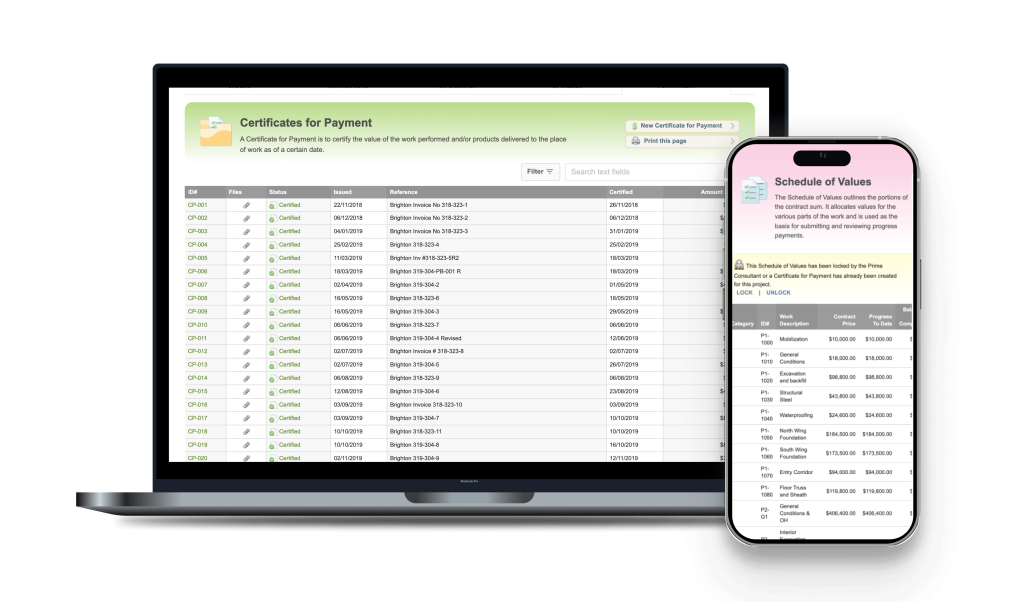
Schedule of Values integration The original contract amount is always tied to the Schedule of Values, ensuring that certified amounts can be reviewed and justified at the line-item level by trade or work category.
Automatic tax calculation Applicable taxes are calculated automatically on the certified amount, no manual arithmetic, no risk of applying the wrong rate.
Cash allowance tracking and reconciliation RForm tracks the expenditure of cash allowances throughout the project and supports their reconciliation when the final accounting is prepared, ensuring these amounts are properly accounted for in every certificate.
Deficiency holdback tracking Amounts withheld for specific deficiencies are documented and tracked separately, so both parties have clarity on what’s being held and why, and release is properly recorded when deficiencies are corrected.
Change order integration Approved change orders in RForm flow automatically into the revised contract amount on your CPs, keeping the contract value current without manual intervention.
Configurable holdback rate Set the holdback percentage at the project level to match the applicable legislation for your province, whether that’s 10%, 15%, or another rate. RForm applies it consistently across every certificate.
Consultant review via Comments and History The Comments and History feature creates a structured record of the consultant team’s reviews and approvals for each payment period, replacing scattered email threads with a single, organized record attached to the certificate.
Team access and accountability Multiple team members can work within the same project record. Whoever reviews, whoever approves, whoever signs, it’s all tracked. No more “who sent the last CP?” conversations.
Professional formatting Certificates are formatted to professional CA standards. Your firm’s information, the project details, and the financial figures all appear exactly where they should.
Cross-document consistency The same project data, contract amount, contractor, owner, project number, appears consistently across all your CA documents. Enter it once; it flows everywhere.
For Potential RForm Customers: What This Looks Like in Practice
If you’re still managing CPs in Word or Excel, here’s an honest picture of the difference RForm makes in a typical project scenario.
Consider a mid-size commercial interior fit-out: 14 payment periods, several change orders mid-project, cash allowances being drawn down across multiple trades, a holdback release after substantial performance, and a final certificate six months later. In a traditional workflow, each of those 14+ documents was a manual exercise, pulling last period’s figures, checking math, updating running totals, reconciling cash allowances, tracking deficiency holdbacks, reformatting, re-sending. Each step introduced the possibility of transcription error. Each document existed as its own island, with no systemic link to the others.
In RForm, that same project produces 14+ certificates where each one builds automatically on the verified record of the last. Cash allowances are tracked throughout. The holdback accumulates correctly at the right provincial rate. Consultant approvals are documented alongside each certificate. When the holdback release comes due, the figures are already calculated. When the client asks for a payment summary at project close, you export it in seconds.
The bottom line for your practice: RForm doesn’t just make CPs faster, it makes them more defensible. A consistent, traceable payment record is one of the most valuable things you can have if a dispute arises. RForm gives you that record as a byproduct of your normal workflow, not as extra work on top of it.
Tips for Existing RForm Users: Getting the Most from CP Workflows
Set up your schedule of values at the start. The time you invest in entering a detailed schedule of values at project outset pays dividends across every payment period. It anchors your contract amount, gives you a structured basis for reviewing contractor applications by trade or work category, and creates a clearer record of what was certified over the life of the project.
Confirm cash allowances are set up correctly. Before billing begins, make sure your cash allowances are entered and properly categorized. This sets you up for accurate tracking as allowances are drawn down and simplifies the reconciliation at project close.
Process change orders before issuing CPs. Whenever possible, approve and log change orders in RForm before issuing the next certificate. This ensures the revised contract amount is current when the CP figures are generated, and avoids the awkward situation of certifying against a contract amount that doesn’t yet reflect approved changes.
Use the consultant review process every period. Build the habit of circulating the contractor’s application through RForm’s Comments and History to your consultants before certifying. Even a brief confirmation from each consultant that work within their scope is proceeding as claimed is a valuable part of your contemporaneous record.
Use the notes field deliberately. If you’re certifying less than the contractor’s application, because of outstanding deficiencies, incomplete work, or a disputed item, document the reason in the notes. This creates a clear, contemporaneous record attached to the certificate itself, not buried in a separate email.
Track deficiency holdbacks explicitly. When you’re withholding an amount for a specific deficiency, log it as a deficiency holdback in RForm rather than simply reducing the certified amount without explanation. This gives both the owner and contractor clear documentation of what is being held and what needs to happen for it to be released.
Issue promptly. The CCDC 2 stipulates that the architect must issue a CP within a fixed number of days of receiving an application. RForm’s efficient workflow removes the bottleneck of document production, so the limiting factor becomes your review of site progress and consultant input, as it should be.
Next in the series — Part 5: Deficiency Management & Project Closeout